|
|
|
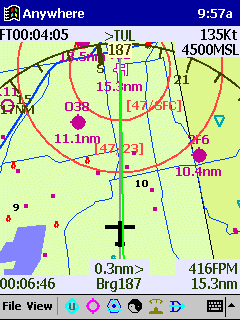
Starting from the top and working down, you can see the following: Time 9:57AM, duration of flight is 4:05, next waypoint is TUL, ground speed is 135 knots, heading is 187 as shown on the EFIS arc, altitude is 4500 msl, red circles show the controlled airspace (ceilings and floors shown), roads, lakes, airports (and distance to them) are shown. The green course line is highly visible. Time to destination is 6:46, the bearing to TUL is 187, the aircraft's current position is .3 nm off to the left of course and the remaining distance to TUL is 15.2 nm. The tool bar on the bottom includes: icons for user waypoints, airports, navaids, day/night mode, EFIS arc/HSI mode and the direct to icon.
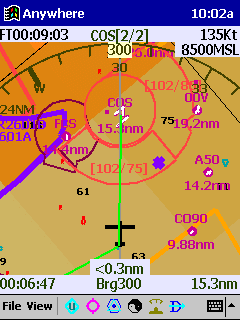
This screen shows information that is similar to the above screen. By tapping any of the airports shown on the screen, you will bring up data about that airport (including the AOPA Airport Directory information). The darker shaded colors on the map represent higher terrain than what is shown by the green on the screen above. Again, ceiling and floor space of the controlled airspace is shown on this screen.
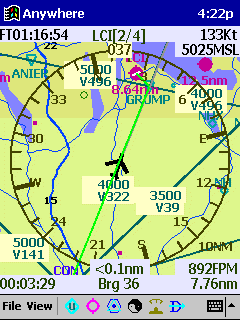
This screen shows the HIS rose instead of the EFIS arc. Also, the option of showing victor airways has been turned on. The Compaq iPAQ screen makes flying a sheer pleasure. The 4,000 color TFT screen, active-matrix display is fully readable in bright sunlight. By tapping the day/night icon, the screen will switch to the night mode which reduces the brightness as needed for night flying.
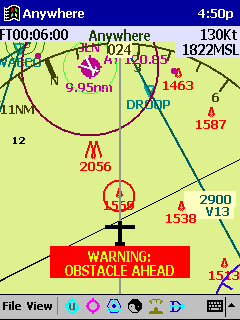
The obstacle warning is on to warn of a potential obstacle hazard. By tapping on the obstacle, you will see the height of the obstacle AGL and altitude of the top of the obstacle. Other warnings include "gear drop", "switch on oxygen" past 12,000, "switch fuel tanks" and "turn on fuel pump".
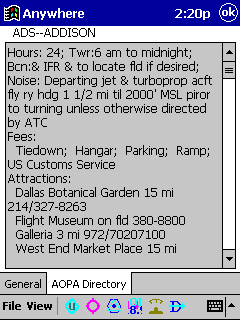
The Anywhere Map software includes the AOPA Directory. Know what services are available at the airport before you arrive. |